Payment guide
How to pay
Send your fee or donation through GCash or any InstaPay banking app, then upload your receipt on the registration form so we can verify it.
1. Scan or send

Account name
Concepcion R Tenorio
GCash number
Open GCash, tap Pay or Scan, and point your camera at the QR above. You can also send to the number directly from any InstaPay-enabled bank app.
2. Know your amount
- Open play (Courts 2, 3, 4)₱1,000
- Family & Friends Play (Court 1)₱4,000
- Donation onlyAny amount
Playing and donating? Add your extra donation on top of your play fee — the form totals it for you.
3. Find your reference number
Right after the payment, GCash shows a receipt with a Reference Number — 13 digits long. You need that number on the registration form.
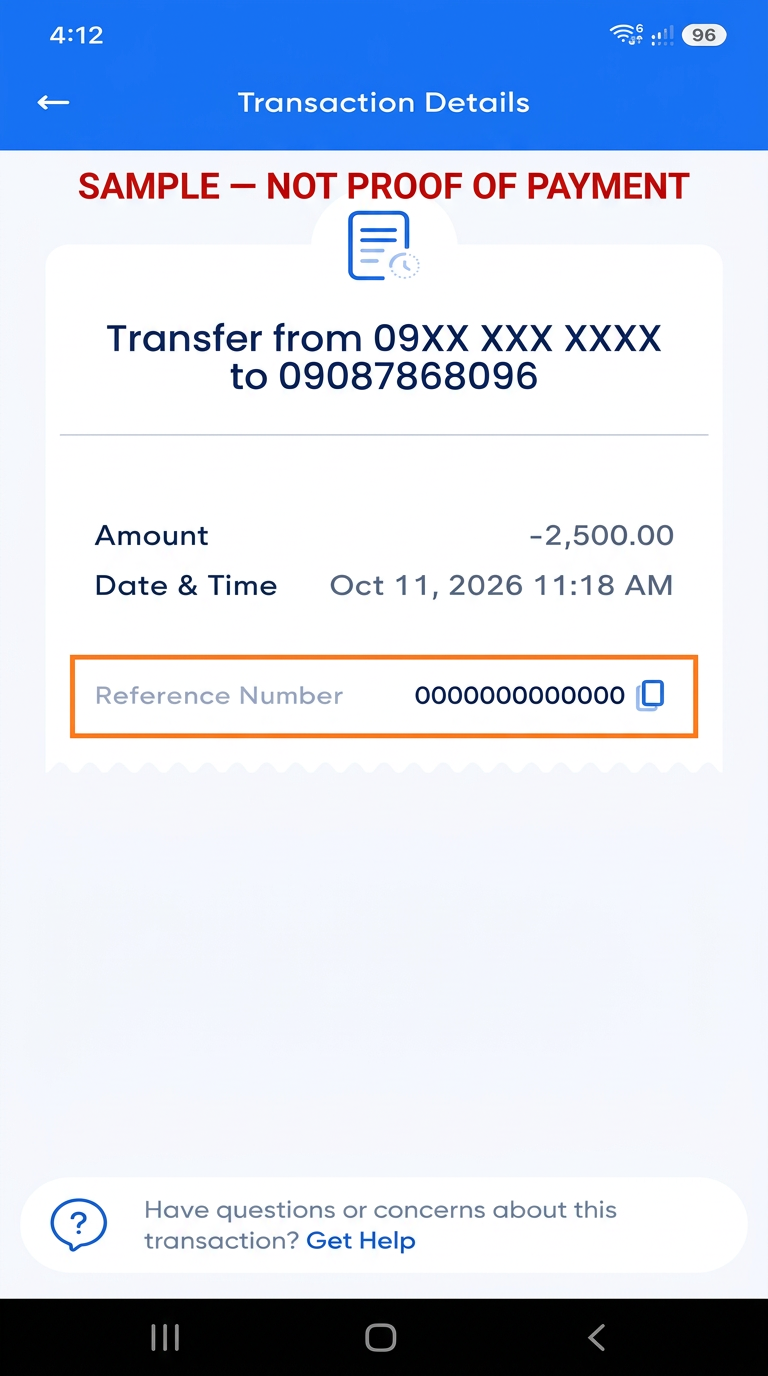
4. Upload your receipt
Screenshot your own GCash receipt, then submit it with your preferred court and time. We check payments as they come in and email you if anything looks off.
Share this guide
Print this QR on your poster or send it to your group — it opens this payment guide directly.
Guide link
…
Quick recap
- 1. Send ₱1,000 per player, ₱4,000 for a family of four, or any donation amount.
- 2. Keep the receipt and note the 13-digit reference number.
- 3. Choose your court — Court 1, Court 2, Court 3, Court 4 — and a time: Morning, Midday, Afternoon.
- 4. Upload the receipt screenshot and save your reference code for check-in.